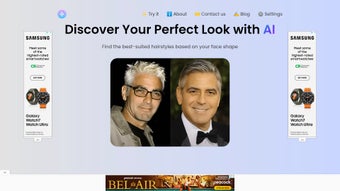

Download My Perfect Hairstyle – AI‑Powered Hairstyle Finder, Free & Secure
Overview
My Perfect Hairstyle is an innovative web‑based application that harnesses artificial intelligence to help anyone discover a haircut that truly matches their face shape, personal style, and the latest fashion trends. By uploading a clear selfie, the tool’s deep‑learning engine analyses key facial landmarks—such as jawline, cheekbones, forehead proportion, and even subtle hair texture cues—and instantly generates a curated list of hairstyles that accentuate the user’s best features. The platform is designed for confidence‑boosting, offering a risk‑free way to experiment with fresh looks before committing to a salon appointment.
Whether you’re a teenager searching for a bold new trend, a professional seeking a polished look, or someone simply curious about what suits you best, My Perfect Hairstyle provides a personalized, interactive experience that removes the guesswork. The interface is clean, responsive, and accessible from any modern browser, making it easy to explore endless style possibilities on a desktop, tablet, or smartphone. The algorithm continuously learns from millions of uploaded photos, refining its recommendations to stay as accurate as possible.
With regular updates that incorporate emerging trends from runway shows, celebrity styling, and user feedback, the app stays relevant and continues to deliver accurate, fashion‑forward recommendations. In short, it’s a comprehensive, user‑friendly guide that turns the often‑intimidating task of choosing a haircut into an enjoyable, data‑driven adventure while keeping privacy and security at the forefront of every interaction.
Key Features
My Perfect Hairstyle packs a robust set of capabilities into a single, easy‑to‑use web app. Each feature has been carefully engineered to address a specific pain point in the hair‑selection process, from the initial analysis of facial geometry to the final step of sharing your favorite looks with friends or a professional stylist. Below is a detailed look at what makes this tool stand out in the crowded lifestyle‑app market.
- AI Face‑Shape Detection: Advanced machine‑learning models automatically identify your face shape, jawline angle, and cheekbone prominence, then match those measurements with hairstyles that enhance natural symmetry and balance.
- Trend‑Driven Library: Over 2,000 curated hairstyles are updated monthly, reflecting runway breakthroughs, celebrity cuts, and street‑style influences so you always see the freshest options.
- Real‑Time Virtual Try‑On: Interactive 3D rendering lets you see each hairstyle on your uploaded photo, with intuitive zoom, rotate, and lighting controls that mimic real‑world viewing conditions.
- Personal Style Filters: Choose preferences such as length, texture, color, maintenance level, and even budget, allowing the engine to narrow suggestions to the most relevant styles for you.
- Cross‑Platform Accessibility: Fully responsive design works on Windows, macOS, Android, and iOS browsers without the need for a separate download, ensuring a seamless experience across devices.
- Secure Data Handling: All images are encrypted in transit via HTTPS, processed on secure cloud servers, and automatically deleted after the session ends, guaranteeing privacy.
- Save & Share Options: Export favorite looks as high‑resolution images, add them to a personal gallery, or share directly to Instagram, Facebook, TikTok, and other social platforms for instant feedback.
- Professional Salon Links: Integrated directory of local stylists who specialize in the recommended cuts, complete with real‑time booking links, pricing estimates, and client reviews.
- Insightful Style Reports: After each session, receive a concise PDF report summarizing why certain styles were suggested, along with care tips and product recommendations.
By combining these features, My Perfect Hairstyle not only simplifies the decision‑making process but also educates users about what truly works for their unique facial structure. Whether you are planning a major transformation or just a subtle trim, the app equips you with all the information you need to make an informed choice.
Installation & Usage Instructions
My Perfect Hairstyle is a web application, so there is no traditional “install” process. Follow these comprehensive steps to start exploring your ideal haircut and get the most out of the AI‑driven experience.
- Choose a compatible browser: Open a modern browser such as Chrome, Edge, Safari, or Firefox on any device that meets the minimum requirements listed below. Ensure your browser is up‑to‑date to support the latest WebGL and HTTPS standards.
- Navigate to the site: Go to www.myperfecthairstyle.com and click the prominent “Get Started” button on the homepage.
- Grant camera access or upload a photo: For the most accurate analysis, allow the website to access your device’s camera, or upload a clear front‑facing photo. Use natural lighting, keep hair away from the face, and avoid filters that may distort facial features.
- AI processing: The engine processes the image in under 10 seconds, detecting facial landmarks and generating a carousel of hairstyle suggestions tailored to your unique geometry.
- Apply style filters: Use the side panel to refine results by length (short, medium, long), texture (straight, wavy, curly), color preferences, and maintenance level (low, medium, high). The suggestions update instantly as you adjust filters.
- Explore virtual try‑on: Click any thumbnail to open a full‑screen 3D simulation. Rotate the model, zoom in on details, and toggle lighting to see how the style looks from different angles.
- Save your favorites: Hit the “Save” icon to add a style to your personal gallery. You can later download the image in high resolution or generate a PDF style report for offline reference.
- Share for feedback: Use the built‑in “Share” button to post your selected looks to social media platforms or send a private link to friends, family, or your stylist for opinions.
- Find a professional: If you decide to move forward, click “Find a Salon” to view a curated list of nearby stylists who specialize in the chosen cut. Book an appointment directly through the integrated booking system.
- Enjoy seamless updates: Because the tool is cloud‑based, new hairstyle collections, algorithm improvements, and security patches are deployed automatically, ensuring you always have the latest features without manual downloads.
Compatibility: The application runs on any device with a recent web browser, including Windows 10 or later, macOS 10.13 or later, Android 6.0 or later, and iOS 12 or later. No additional plugins or software are required.
For power users, the site also offers a keyboard shortcut guide (press “?” for help) and an optional “Dark Mode” toggle for low‑light environments. If you encounter any issues, a live chat widget is available 24/7 to assist with troubleshooting, privacy concerns, or styling advice.
Pros, Cons, FAQ & Final Verdict
Pros
- Highly accurate AI that tailors suggestions to individual facial geometry.
- Extensive, constantly updated hairstyle database with over 2,000 options.
- Zero‑cost entry with no hidden fees for core features.
- Secure handling of personal images—HTTPS encryption and automatic deletion.
- Responsive design works on all major operating systems and device types.
- Integrated salon directory simplifies the transition from virtual try‑on to real‑world appointment.
- Insightful style reports help users understand why each recommendation fits.
Cons
- Requires a clear, well‑lit photo for optimal AI accuracy; poor lighting can affect results.
- Virtual try‑on is rendered in 2‑D; true 3‑D modeling with depth perception is not yet available.
- Limited offline functionality since it relies on an internet connection for processing.
- Premium add‑ons (high‑resolution export, exclusive salon discounts) incur a small fee.
Frequently Asked Questions
Is My Perfect Hairstyle really free?
Yes, the core AI analysis and virtual try‑on features are completely free. Premium add‑ons, such as high‑resolution export and exclusive salon discounts, may carry a small fee, but the basic experience does not require payment.
How secure is my uploaded photo?
All images are transmitted over HTTPS, encrypted in transit, and automatically deleted from our servers after the session ends. We never store personal photos without explicit consent.
Can I use the tool on a mobile device?
Absolutely. The web app is fully responsive and works on smartphones and tablets running Android 6.0+ or iOS 12+. The camera integration works seamlessly on mobile browsers.
Do I need a powerful computer to run the AI analysis?
No special hardware is required. The heavy lifting is performed on our cloud servers, so any device that can run a modern browser will handle the analysis quickly.
How often are new hairstyles added?
Our team updates the library monthly, incorporating runway trends, celebrity looks, and user‑generated suggestions to keep the catalog fresh and relevant.
Conclusion & Call to Action
My Perfect Hairstyle bridges the gap between cutting‑edge AI technology and everyday style confidence. Its accurate face‑shape detection, expansive trend‑driven library, and user‑friendly interface make it a standout tool for anyone looking to experiment with hair without the risk of a costly salon misstep. While it relies on a good‑quality photo and an internet connection, those minor limitations are outweighed by the convenience, security, and free access it provides. If you’re ready to explore a world of personalized hair options, simply visit the site, upload your photo, and let the AI do the rest. Take control of your look, boost your confidence, and step out with a hairstyle that truly feels like you.
Start your free AI hairstyle session now and discover the perfect cut you’ve been waiting for.



.png)



